An Overview of React Hooks
What are Hooks?
As someone newly entering the world of React, Hooks were one of the first things brought to my attention. After getting a taste of class-based components, React Hooks came up on my plate as a topic I should review. Although the official React site says that Hooks are “completely opt-in,” and can be used in tandem with your existing classes, my reading has shown that Hooks are highly recommended in the React Community.
Prior to the introduction of React Hooks, state was not able to be used by functional (stateless) components, so class (stateful) components were necessary to define state in the component. Because of this, complex components with stateful logic were not easy to break down or reuse. With the power of Hooks, JavaScript functions give you the capability to “hook into” stateful features of a React Component, meaning you can declare state variables without classes and reuse stateful features among components. And because Hooks are JavaScript functions, you can use React’s built-in Hooks to create “Custom Hooks” that can be utilized throughout your application. Let’s take a high-level look at the built-in Hooks that React provides.
Two main types of React Hooks
State Hook Example:
State Hooks are easily imported and allow you to add React state to function components. The most common State Hook is useState, which replaces the need to create a class component using this.state. The below example demonstrates usetate in a functional component “Animorphs.”
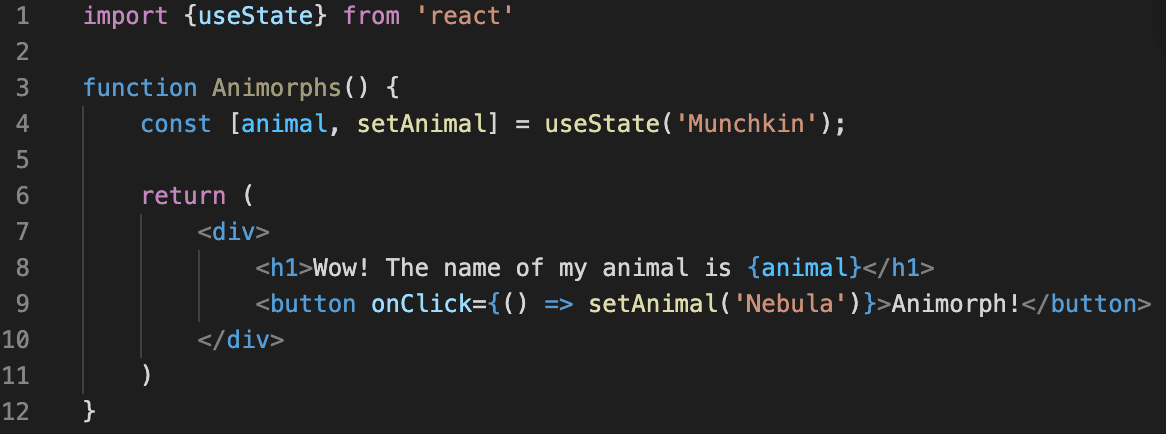
The useState Hook gives us an initial state value, in this case the animal name “Munchkin”, and returns an array (using array destructuring syntax) with 2 items: “animal” and “setAnimal.” “animal” is the current value, and “setAnimal” is a function that, when called by the onClick event listener, updates the name of our animal! For more on State Hooks, visit https://reactjs.org/docs/hooks-state.html!
Effect Hook Example:
The next type of React Hook is an Effect Hook, which permits the use of lifecycle methods and performing side effects in functional components. Side effects are when a component's state or variable changes based on a procedure outside of its scope. The useEffect Hook effectively replaces componentDidMount, componentDidUpdate, and componentWillUnmount all in one. You can begin with useEffect by importing it just like we did useState.

Continuing with our example on useState, useEffect is put inside our function component in order to access our props, in this case the “animal” state variable. Our effect, passing a function to the useEffect Hook, sets the document title with the browser API after React updates the DOM. Whenever the component state changes, or new props are received, the component will re-render and the useEffect hook will run. useState and useEffect are considered the two most important hooks, but there are several others.To see a complete list of APIs of built-in React Hooks, visit https://reactjs.org/docs/hooks-reference.html.
React Hooks Rules
Call Hooks at the Top Level Only
Do not call your Hook inside loops, conditions (BUT conditions can be put inside your Hook), or nested functions. By following this rule, React is able to accurately preserve Hook states between useState and useEffect calls because Hooks will be called in the same order every component rend.
Call Hooks from React Components Only
Do not call your Hooks from JavaScript functions, only React function components or your own custom Hooks. The Hook will not be accessible in a regular JavaScript function OR when imported without importing React as well.
Call Hooks from Custom Hooks
JavaScript functions that have a name beginning with “use” and may call other Hooks are considered Custom Hooks. Below is an example of creating a Custom Hook:
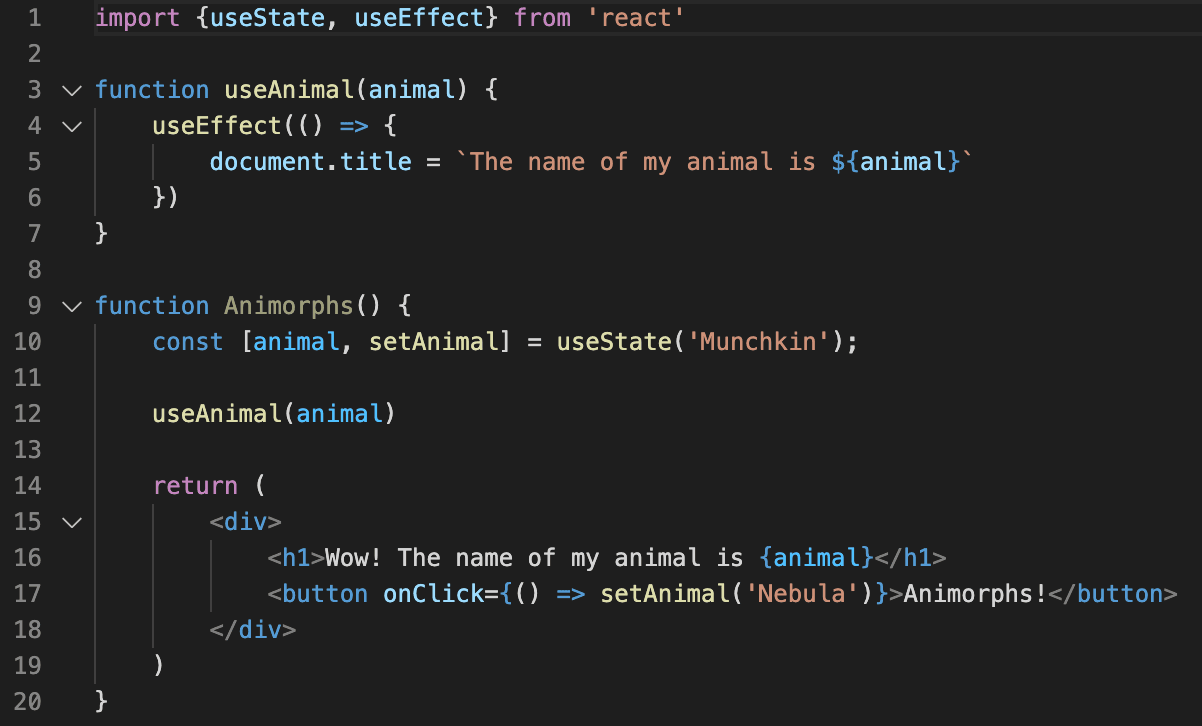
In this example, our custom Hook is “useAnimal” using the custom argument “animal.” “useAnimal” is now called in the function “Animorphs” component and can be shared among other components! Custom Hooks can share stateful logic between components in your application without bulking up your component tree and can be used multiple times in the same component. React also includes a default plugin to ensure these above rules are followed at https://reactjs.org/docs/hooks-rules.html#eslint-plugin.
Conclusion
With the React community embracing Hooks, the number of React concepts you need to juggle in your application is minimized. Hooks allows for the utilization and reuse of function components rather than shifting between functions, classes, higher-order components, and render props. Because of this, React plans to cover all use cases of class components, so it’s time to get learning Hooks!